What course participants say

  • Complete overview of Power BI's capabilities, clear course materials and sufficient depth in the examples and explanations/theory

    Complete overview of Power BI's capabilities, clear course materials and sufficient depth in the examples and explanations/theory

  • I attended the basic Power BI course. Thanks to the experienced instructor and plenty of room for my own input, I can now build dashboards myself. Highly recommended๐Ÿ‘Œ

    I attended the basic Power BI course. Thanks to the experienced instructor and plenty of room for my own input, I can now build dashboards myself. Highly recommended๐Ÿ‘Œ

  • Good explanations and guidance. Nice insight into how it works. I also appreciated Robbert's real-world examples. I'm inspired and now understand the possibilities, limitations and technical principles.

    Good explanations and guidance. Nice insight into how it works. I also appreciated Robbert's real-world examples. I'm inspired and now understand the possibilities, limitations and technical principles.

  • Now I know enough to be able to guide builders and contribute to their work. And that's what matters to me.

    Now I know enough to be able to guide builders and contribute to their work. And that's what matters to me.

  • Clear structure, pace adapts to the group. Nice that there was room for own questions and scenarios. I can now get started with our own datasets.

    Clear structure, pace adapts to the group. Nice that there was room for own questions and scenarios. I can now get started with our own datasets.

  • Extremely satisfied with the course. The course is well structured. From the general explanation of what Power BI is to detailed DAX formulas. It is easy to follow and there is plenty of room to ask questions. Definitely recommended!

    Extremely satisfied with the course. The course is well structured. From the general explanation of what Power BI is to detailed DAX formulas. It is easy to follow and there is plenty of room to ask questions. Definitely recommended!

  • Clear explanation without jargon overload. The practical examples make it concrete. I now know what is and isn't realistic within Power BI for our organization.

    Clear explanation without jargon overload. The practical examples make it concrete. I now know what is and isn't realistic within Power BI for our organization.

  • Excellent training, clearly explained, with room to apply it immediately with the necessary support

    Excellent training, clearly explained, with room to apply it immediately with the necessary support

  • Complete overview of Power BI's capabilities, clear course materials and sufficient depth in the examples and explanations/theory

  • I attended the basic Power BI course. Thanks to the experienced instructor and plenty of room for my own input, I can now build dashboards myself. Highly recommended๐Ÿ‘Œ

  • Good explanations and guidance. Nice insight into how it works. I also appreciated Robbert's real-world examples. I'm inspired and now understand the possibilities, limitations and technical principles.

  • Now I know enough to be able to guide builders and contribute to their work. And that's what matters to me.

  • Clear structure, pace adapts to the group. Nice that there was room for own questions and scenarios. I can now get started with our own datasets.

  • Extremely satisfied with the course. The course is well structured. From the general explanation of what Power BI is to detailed DAX formulas. It is easy to follow and there is plenty of room to ask questions. Definitely recommended!

  • Clear explanation without jargon overload. The practical examples make it concrete. I now know what is and isn't realistic within Power BI for our organization.

  • Excellent training, clearly explained, with room to apply it immediately with the necessary support

2 Days
2 Days
2 Days
Wageningen / Nieuwegein / In-company
โ‚ฌ1,095 excl. VAT
โ‚ฌ1,095 excl. VAT
โ‚ฌ1,095 excl. VAT
Max. 10 participants

Why Power BI?

In recent years, the amount of data being collected has increased at a rapid pace. Excel has long been the go-to tool for analysis, but it is increasingly hitting its limits. The data that needs to be analyzed is located in too many different places, is too complex, or simply too much to be analyzed in Excel. Power BI is a Business Intelligence (BI) tool that offers the ability to load large amounts of data from different sources and create a dynamic report from it. In this practical two-day Power BI basics course, you will learn the core of the program. After the course, you will have sufficient knowledge to create your own report.

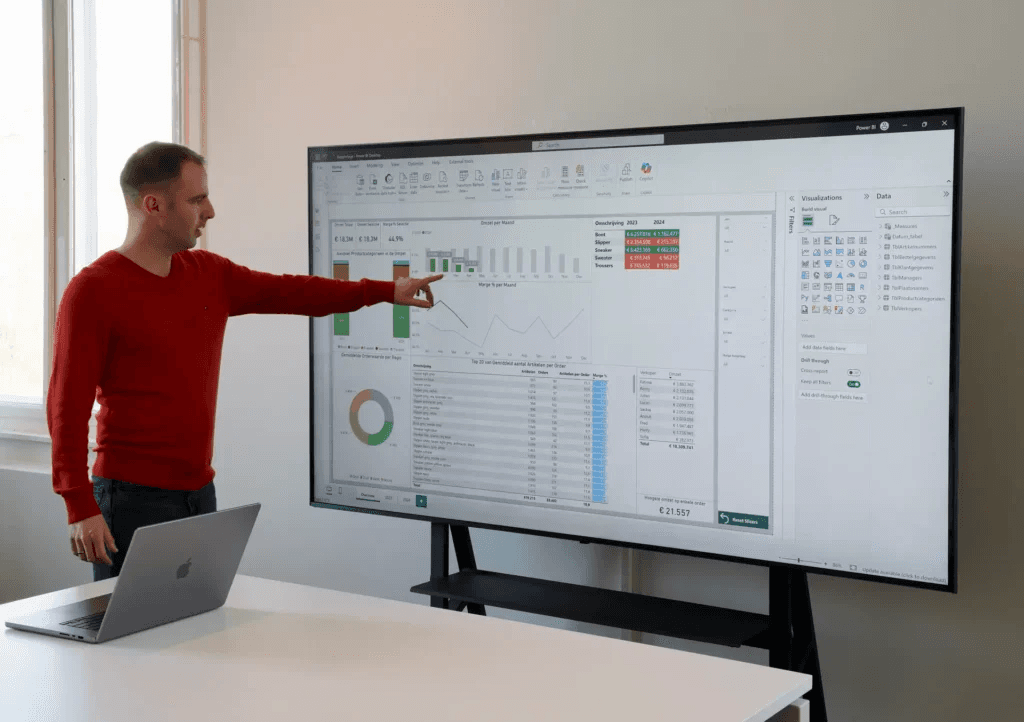
Robbert at a laptop during a Power BI training

Course topics

Loading data into Power BI

During the course we connect to two common data sources: SQL Server and Excel files. The data from these files is loaded into the Power Query Editor. After the dataset is loaded, we select the correct columns for our report, look for any errors in the data and make small adjustments to the data. Finally, we import the data we need into Power BI.

Modeling data
Creating a report

For whom?

Business Consultants, HR Department Employees, Marketers, Sales, Logistics and Finance Staff, Analysts, Business Controllers, Accountants, Financial Specialists, BI specialists, financials and other experienced Excel users who want to build BI dashboards.

Prerequisites

Some knowledge of Excel is recommended to participate in this training.

Colleagues reviewing a Power BI report on a laptop
Participants working on laptops during a Power BI training

What does this training offer you?

During the 2-day Power BI basics course, you will receive many exercises as well as various practical examples to work with. After the course, you can build reports on your own data independently.

The different components and basic use of Power BI

Importing data from different data sources

Connecting various data sources and creating relationships

Building an efficient and simple data model

The importance of date tables and how to create them

Visualizing information and creating reports

Publishing and sharing reports via the Power BI Service

Why choose us?

100+ Satisfied course participants

Guaranteed to run

10+ years of practical experience

Money-back guarantee if you're not satisfied

Reference material included

Working consultant, not a professional trainer

Certificate of attendance

Power BI report on a laptop

Frequently asked questions

Do I need prior knowledge?

Basic knowledge of Excel is sufficient. Programming experience is not needed.

Can I build dashboards myself after the training?
What should I bring?
Does the course always take place?

From scattered data to concrete results

In a brief call we discuss your situation and determine the best approach.

From scattered data to concrete results

In a brief call we discuss your situation and determine the best approach.

From scattered data to concrete results

In a brief call we discuss your situation and determine the best approach.